Target Audience
This article targets professionals involved in planning and implementing a mediacockpit solution, specifically Sales Engineers, Business Consultants, and Solutions Architects. It provides these roles with the foundational information and structured guidance necessary to lead or assist in a successful implementation. For Sales Engineers, it offers technical insights to address client-specific requirements. Business Consultants will find frameworks to align mediacockpit capabilities with business processes and goals. Solutions Architects can leverage the article to design and integrate the solution effectively within the client’s existing system landscape, ensuring alignment across teams and project stages.
Prerequisites and reference materials
Before starting with a mediacockpit implementation, we recommend receiving dedicated training on the configuration and usage of the system, either directly from @Bertsch or a qualified partner.
The content of the manual is critical guidance for performing the configuration, see
https://docs.mediacockpit.info/articles/MCEN-A-36668474/mediacockpit-manual
and referenced sub articles for additional information.
mediacockpit Blueprint: Where to start?
Every system integrator and consultant will have their own philosophy about how to best manage a PIM/DAM/PCM implementation project. We assume readers of this article bring the necessary prerequisites and industry experience to extend this blueprint to suite their own purposes.
Since the data model in mediacockpit is generic and configurable, the first key topic is identifying and defining the object types (i.e. product, article, …), their relevant data (attributes), possible relations (in hierarchy but also between each other) and additional (optional) features like workflows, groups and permissions, etc. in the context of mediacockpit.
Since all of this can (but also must) be configured in mediaadmin, this analysis and definition of the data model the important first step in every implementation:
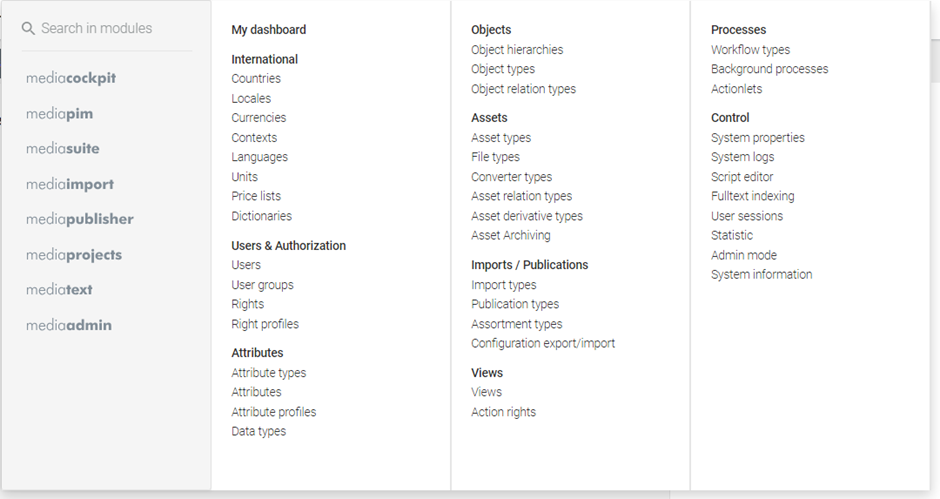
Of course, the system includes standard data definitions like countries and currencies as well as the most common data types (String, Integer, Boolean, etc.).
Beyond this, however, the entire configuration and definition inside the system is completely up to the customer (and the partner who advises them).
A list of topics (EPICS), and their priorities in terms of order of execution is provided below as a blueprint. This may need to be adapted by the implementation team, based on the situation you find at the customer site, but should provide a structure for guiding the implementation.
Using this blueprint
- Every customer is different, and requirements will vary from industry to industry and project to project.
- Additional tasks and topics that arise, for example, during discovery, must be integrated into this framework, important here is just that the key configurations in the system are checked.
- Accompanying every subtopic below are small doses of customer training and acceptance criteria with approvals to ensure all stakeholders are on the same page about what is offered, what is delivered, and what is then a change request later.
Step 0: Getting Started and Discovery
The initial phase, involves a comprehensive analysis to understand key dimensions of the system, addressing requirements, stakeholder roles, and system interactions. This step includes choosing the mode of operation (on-premise or SaaS), establishing foundational training in mediacockpit terms, and defining the articleation approach. Clear, centralized articleation ensures efficient communication and reduces reliance on easily lost informal channels like email or chat.
Analysis: the key dimensions are USER, DATA, PROCESS and SYSTEM
- What is required (this step is valid for every subtopic)?
- Who are the stakeholders? What are their roles?
- What systems and interfaces are involved?
- What are the key processes and workflows relating to data?
- How will these topics be mapped to the “mediacockpit blueprint”
Decision: Mode of operation
- On premise: IT requirements, hardware procurement, security, mode of operation,
- SaaS: start date (much less bureaucracy), required interfaces? Sizing? Etc.
Training in the basics and terminologies in mediacockpit:
- Making sure everyone speaks the same language simplifies the following steps
- This and linked articles can be a good starting point:
https://docs.mediacockpit.info/articles/MCEN-A-62457156/Common-terms-and-abbreviations
Documentation
- The scope and format of the documentation will vary depending on customer and integrators: issue driven? Project wiki? PDF articles? Excel sheets? OR a combination of all these are commonplace.
- We recommend against email and teams for official communication, since one on one chats and messages are too easily lost when not documented and archived properly.
Step one: Initial Data Model: PIM + Base
Defining and structuring attributes and product master data is crucial, encompassing the types of data maintained, the helper objects needed (units, currencies, data types, etc.), and key aspects of the data model. This process involves identifying product hierarchies, and relations and ultimately shaping the object types and hierarchies required in mediacockpit.
- Attributes : what data is to be maintained? What helper objects are required: units, currencies, languages, data types (also custom types), etc.
- (we provide a macro driven Excel workbooks to assist in defining and then importing attributes)
- Product master data – the nature of the data and the type of the customer can have major implications for the data model, how broad and how deep is it? Key questions include
- Is master data consistent across all products?
- Do we have different groups of products we want to separate into different hierarchies?
- Do we have only internal data or are we receiving data from suppliers?
- Do we have “data components” we need to relate to each other? For example, product assemblies from source data systems, or synthetic PIM specific “components” we need to re-use via reference? Examples could be “color entities” with their own attributes: image, description, RGB value, CMYK or Pantone, etc.
- The answers to these questions will result in the quantity of object types and object hierarchies required to maintain master data
- If needed, what classification system(s) are relevant? Customer specific? Industry specific?
- What attributes and values are relevant per object type (or classification)
- What relations between objects (x-sell, also set, composite, …)
Acceptance
As the data model is build, it is crucial to validate it with representative data.
Keep in mind
The data model is not set in stone: but a solid foundation is required to build upon. As new requirements arise: Iterate these questions and extend the data model appropriately.
Step two: Initial Data Model: DAM
Once initial data in PIM is validated, you can continue with additional steps e.g. for DAM. Depending on customer requirements, the data model can be simple, essentially folders, files and keywords, or the model can as rich as in the PIM.
Key topics
- Data sources? Where are media coming from? One-off migrations? Or are there interfaces to be considered?
- Data model in DAM: The basic features of mediacockpit DAM must be addressed, at a minimum: media types, derivative media (rendition) types (and converter configurations to create them)
- Attributes for DAM (see notes above regarding attributes)
- Taxonomy and organization: what is the ideal structure for storing media?
- Permissions: our recommendation is “keep it simple” – set permissions
- Linkages to PIM objects via attributes: common linkages: primary image, additional images, logo(s), data sheet(s), etc.
- Is media versioning required? How do versions relate to product data? Always latest version? Or manual updates as needed?
- Sharing: should media be shared internally? Or also allow external access?
Acceptance
Validate data model with representative data.
Keep in mind
As with PIM, the data model is not set in stone: but a solid foundation is required to build upon. As new requirements arise: Iterate these questions and extend the data model appropriately.
Depending on the focus of the customer during the implementation, this topic may be addressed first before the PIM topic.
Step three: Roles, rights and permissions
Mediacockpit uses a system of user roles, permissions, and rights to control access to its features. There are four standard user roles: STANDARDUSER, POWERUSER, CONFIGADMIN, and ROOT. Each role has a different level of access to the system. Permissions are assigned to users and groups, and they determine what actions a user can perform. Rights are further divided into action rights and object rights. Action rights control access to specific functions, while object rights control access to specific data. The system also allows for custom rights to be defined, which can be used to restrict actions such as workflow state transitions or download of derivatives.
Key topics
If roles, rights and permissions are a priority (not always the case) then the following areas must be addressed:
- Users and roles
- Groups and permissions
- Workflows / state types
- Single sign-on (SSO)
- Views and action rights
The base permissions and rights per role should be adequate to get a customer up and running. Since building of views and defining the action rights per group is somewhat time intensive, this is often postponed until the more pressing topics related to the initial implementation have been addressed.
See also
A good starting point for this discussion is the Rights and Roles Concept:
https://docs.mediacockpit.info/articles/MCEN-A-36668517/Rights-and-roles-concept
Step four: Data onboarding
Once the data model is validated with representative test data, the onboarding of initial data must be completed. Depending on the initial situation, this can be a quick task or a major project.
Key topics
Key topics to address include
- Data sources
- Data formats
- Data cleansing before / during import
- One-off imports: (initial) data migration
- Repeating / continuous imports (e.g. ERP)
- Data suppliers?
- Data feeds? API integrations?
See also
A good starting point for this discussion is the article
https://docs.mediacockpit.info/articles/MCEN-A-36668519/Importing-data
Keep in mind
onboarding initial data can quickly get out of hand, especially if data from the previous system is poor or non-existent. This is why we recommend performing this onboarding task separately and after the acceptance of the data model.
Step five: Assortments and publications
Once data is in the system, the question arises: how and what data to we need to get out of the system again? These are your output channels and formats. The scope of this topic will vary based on many factors such as markets, languages, target audiences and more.
Key topics
The key definitions we need to achieve in mediacockpit include:
- Assortment types
- Navigation types (e.g. categories, or chapters to structure assortment)
- Automation? From where?
- Publication types
- Formats (flat-file, XML, …)
- Content (assortments, search results, …)
- Filtering (by attribute, by language, by state, …)
- Channels and channel actions (e.g. SFTP transfer)
- Database publishing? Is it planned? Are existing templates available?
- Datasheets
- Catalogs
- Other formats
- What do the processes look like today? What is planned?
- Who assembles assortments?
- Who starts publications?
- What degree of automation is required?
See also
A good starting point for this discussion is the article
https://docs.mediacockpit.info/articles/MCEN-A-62457147/Publications-and-assortments
Step six: Data quality
With the reporting feature, you can run queries on the data in mediacockpit and produce reports on the results. After a report is executed, a reporting result is available for further analysis and processing.
Key topics
Key metrics to define for data quality:
- Initial reporting definitions
- Additional requirements i.e. custom reporting definitions
See also
A good starting point for this discussion is the article
https://docs.mediacockpit.info/articles/MCEN-A-36668579/Data-quality-reporting
Step seven: Automation and APIs
In mediacockpit, incoming APIs typically handle tasks such as importing product data or digital assets from external sources, validating and mapping data to ensure consistency with internal formats, and updating or enriching existing records in the system.
Outgoing APIs are used to deliver curated data or assets to external platforms, such as e-commerce sites, ERP systems, or marketing channels. These APIs may need to support data transformation to meet the target platform’s requirements, provide filtering options to select relevant data, and ensure real-time or scheduled data synchronization, maintaining consistent information across all connected systems.
Integration feature set
Mediacockpit provides the following features and functions that should be leveraged in these scenarios
- Import profiles (including scheduled imports) via mediaimport
- Export (publication) profiles including scheduler via mediapublisher
- A full read/write REST API for data
- A full scripting API including
- actions to run on a scheduler
- custom endpoints in scripting
- data transformations in import and export with the aforementioned modules
- A variety of imports, exports and formats for specific use cases in the “ext” and “contrib” modules.
- for Integration points i.e. in workflows to connect to push data to systems like i.e. Apache Kafka
- A full Java API for additional customizing of any sort.
When determining needs, these existing interfaces should be evaluated in that order, that is, by focusing on leveraging existing integrations and APIs before moving onto more complex integration scenarios
Key topics
Key topics to address:
- Incoming APIs
- Outgoing APIs
- (Near) real time integration
- Scheduled integration
- Trigger driven integration
See also
Good starting points for this discussion include
https://docs.mediacockpit.info/articles/MCDG-A-33227106/Customizing
https://docs.mediacockpit.info/articles/MCDG-A-33227011/mediacockpit-Developers-Guide (requires login)